In short: In November 2026 the Lourdin RPG combat board was rebuilt: flat hex tokens, a card that lifts over the foe you pick, 52 painted battle maps with small living details, and sound shaped to every blow. The Loadout replaces the Spellbook, the Armory replaces the Bag, and friends now add each other with a friend code.
Pull up a chair and order something warm, because this is a big one. In November 2026 we rebuilt the Lourdin RPG combat board from the ground up: flat hex tokens, a card that lifts over the foe you pick, a camera that knows where to look, 52 painted battle maps and sound shaped to every blow. Outside the fight, the Loadout replaces the Spellbook, the Armory takes over from the Bag, and friends add each other with a code. Here is what you will see, and why we made each change.
What does the new combat board look like?
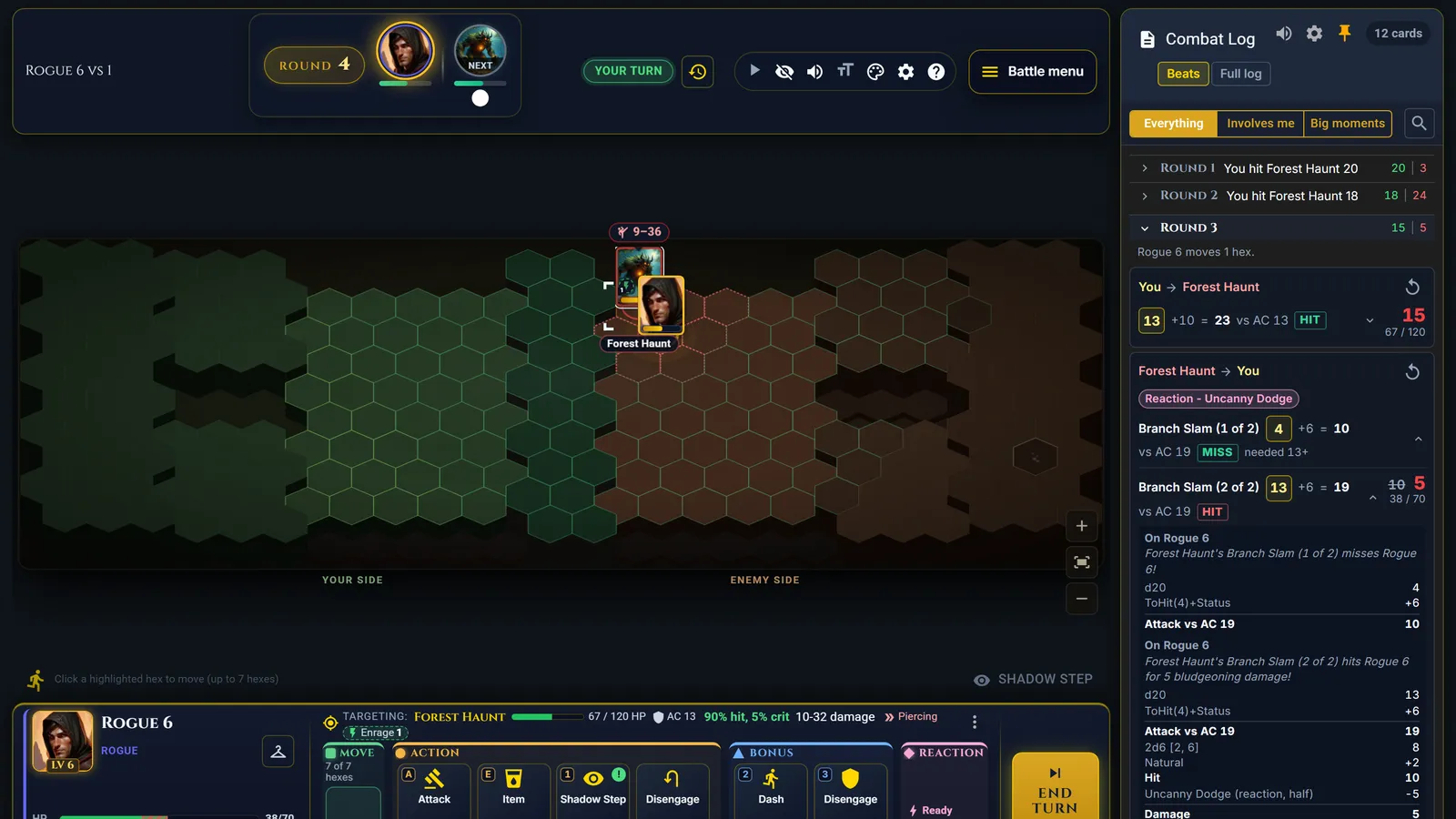
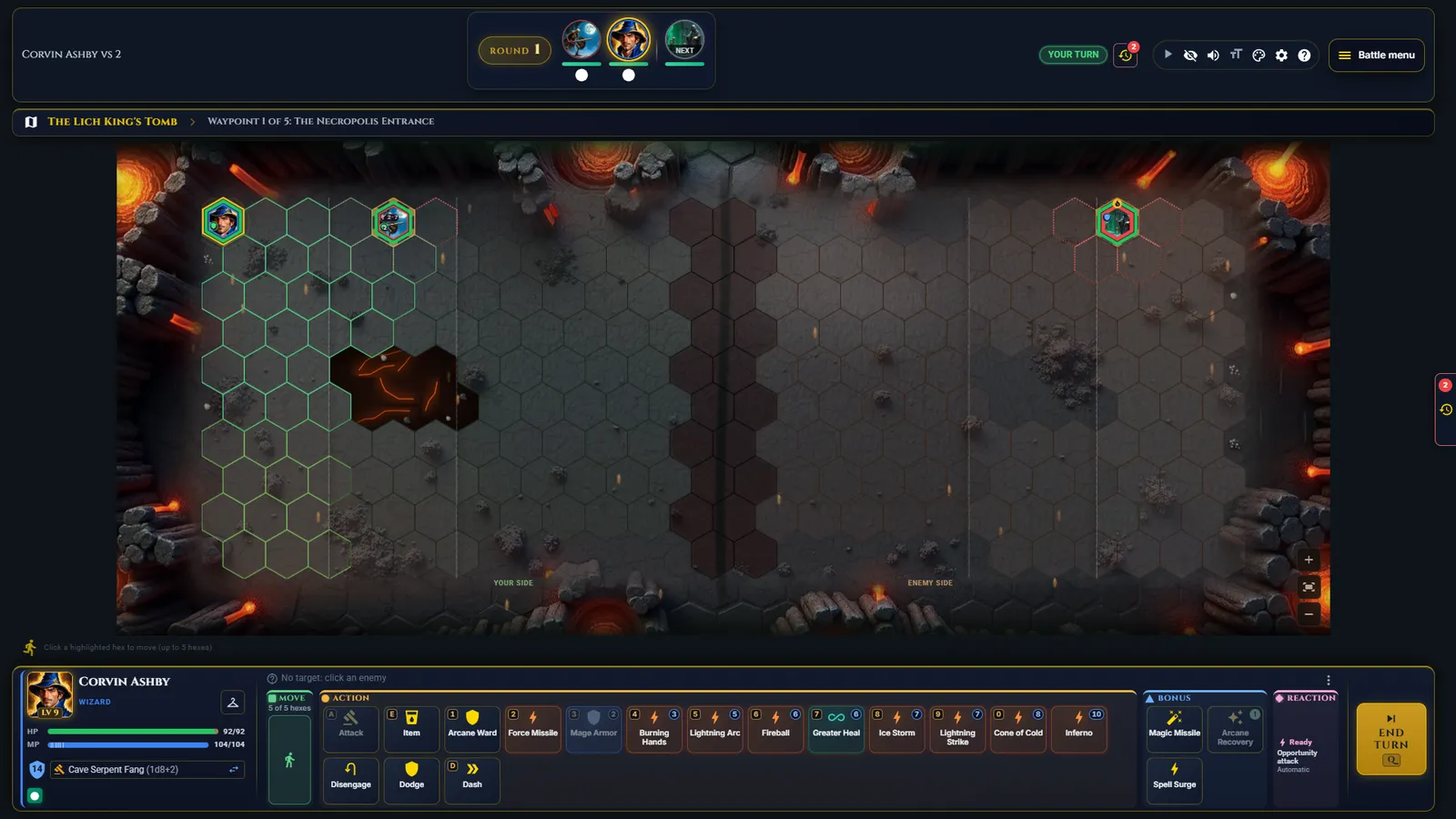
The board is now seen from straight above, and every creature stands on a flat hex disc: its portrait in the middle, a ring that shows its side, and its health around the rim. The rim drops the moment a blow lands, and a pale ghost of the lost health drains away after it, so you see exactly how hard that hit was.
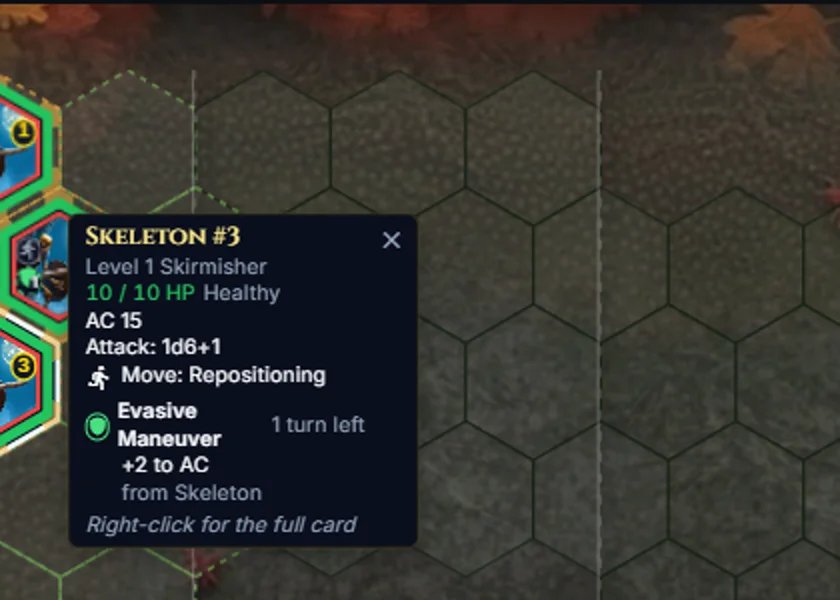
Pick a foe and a small card lifts beside it with what you need to decide your turn: its name and level, its hit points and how hurt it is, its Armor Class, its attack, what it means to do next, and every condition on it with the turns left and who put it there. An X closes the card, and clicking the foe again opens it. On a computer, a right-click still opens the full card.
The fight camera frames the action for you. When a fight spreads too wide to show everyone at a readable size, it keeps the creature acting and its nearest foes in view, and anything left off screen gets an edge cue: an arrow with a count at the board's edge. Tap a cue and the camera pans there.
Under it all lie 52 painted battle maps, four for each of 13 settings, from the Old Road and the forest to swamp, ice and volcano. Each waypoint of an adventure draws its own map, so a road changes as you walk it, and the same waypoint always looks the same when you come back. Around each map's border, 166 small living details move: embers drift, mist creeps, light glints and branches sway. They never draw over a hex, and if your device asks for reduced motion they hold still.
The board also makes better use of a big screen. On a wide monitor it grows to the height of the screen, and on an ultrawide 3440 by 1440 display it draws about 2,700 pixels across, with the painted map running to the screen's edges. We also cut the work the board does on every frame, so busy fights stay smooth, and a fight downloads only its own map.
Can I keep the board still?
Yes, and this one came straight from a player's feedback: on a desktop PC the board zoomed in and out as actions happened, and they would rather it held still. Fair enough. Open the combat settings drawer (the cog on a computer, or Settings in the Battle menu on a tablet or phone) and turn on Steady Camera.
With it on, the board holds its whole-board view. Nothing zooms, pans or shakes on its own at turn changes, critical hits or kills. Your own zoom, drag and recentre still work, and the hits, damage numbers and other effects still play. It is saved to your account, takes effect at once, even mid-fight, and is off unless you turn it on.
What does a fight sound like now?
Every blow now sounds like the weapon that struck it: a slash, a pierce, a blunt thud or an arrow. The sounds that repeat most come in two to four variations, picked so the same one never plays twice in a row, which means an Extra Attack sounds like two swings, not one swing stamped twice. A critical hit lands with a short, held freeze. An area spell bursts on its first target and then rolls across the others more quietly, one by one.
Some sounds now last as long as the thing they belong to. A Barbarian's Rage has a start, a low loop and an end. A creature caught in fire, frost, poison or a stun carries a quiet sound of its own while it lasts, and a boss carries its own presence while it stands. Each of the 13 settings also has its own bed of ambient sound: it fades in after the encounter's opening sting, dips under every hit, critical, spell and death so the action stays clear, and fades out when the victory or defeat screen opens.
Every sound in the game is made from scratch by our own code, with no recorded samples. The volume and mute controls cover all of it.
What changed in the hotbar and the combat log?
The hotbar is easier to read. The little badge in a card's corner is your hotkey, and it now looks like a key on a keyboard, so nobody mistakes it for a cooldown or a cost. Channel Divinity and Bardic Inspiration show their uses left in the corner, such as "2/3", and hovering the card says "2 of 3 uses left" and, at levels 1 to 4, which round the next use comes back. Cooldowns are spelled out as "Cooldown: 2 turns", and the old "CD" on the hero frame is now Channel Divinity's own icon.
Playing on a phone held sideways, the combat log now has a peek row in the top strip: the latest turn in a line or two. Tap it and the whole log rises as a sheet over the board; swipe it down to get back to the fight. After the fight, the battle report fills the phone's screen, with Copy log and Done at the bottom. The new combat log devlog explains the turn cards themselves.
What is the Loadout?
The Loadout is the new home of your spells and abilities, and it replaces the Spellbook. It opens from the tavern's spell station (and from More and the Hall of Heroes) and shows your hotbar exactly as a fight will draw it, with the same lanes and keys. Under it sits a bench of your spells, with New and On bar marks and a search.
Tap a spell and its card opens with one clear action: Add to bar when a slot is free, Swap onto the bar when the bar is full (pick the spell it replaces), or Remove from bar. Every change comes with Undo. You can pin up to 10 actions, and a pinned one goes first in its lane in a fight. Spells you cannot cast yet are shown with the level they open at.
The "N new spells" number on the tavern station finally clears. It counts spells opened to you since you last looked, and it resets once you open the Loadout. Before, it could hang around long after you had looked, a bit like a tavern bell that never stops ringing.
Warriors, Rogues, Rangers, Monks, Barbarians and Pirates are not left out. Their page is the Battle kit: the same hotbar with their abilities, their pins, and what their class learns next. The spells guide covers how spells work in a fight, and you can compare all 10 classes to see who casts what.
Where did the Bag go?
The Bag retired, and the Armory took over its jobs. The tavern's Bag station is now the Armory station, and it opens your gear. The pack there tells you how many items are new since your last visit ("3 new since your last visit"), offers a search once it holds more than 12 items, says plainly when your potion pouch is full, and lists what each potion, scroll or buff does under its description. If a ring or cloak ever ended up in the wrong slot, the Armory now puts it right when it opens and tells you what moved.
After a won fight, the "Try your new gear" window has the Armory's look too: your worn gear's AC, attack and damage at the top, then the drops with clear verdicts. A weaker item says so in red, such as "-1 AC". Compare now opens inside the window, where before, clicking an item opened its details behind it and seemed to do nothing. The Off hand button for a second light weapon works now as well.
How do friend codes work?
Friends now add each other with a friend code, such as LRPG-7K3Q9M. Yours sits on your Fellowship page with a Copy button: give it to a friend, and they type it into Add Friend. Capitals, spaces and dashes do not matter, and the code leaves out letters that look alike, such as O and 0, or I and 1. If you ever want a fresh one, New code replaces it; the old code stops working at once, and your friends stay your friends. Players are no longer found by searching their names.
You also choose which hero your friends see. Open a hero's menu in the Hall of Heroes and pick Show to friends; your friends then see that hero in Fellowship, in messages and in the tavern's common room. If you never choose, we pick for you, starting with your most played hero.
And hero names are now unique across the realm. A new hero or a rename cannot take a name that is already taken ("That name is taken. Try another."). Heroes who already shared a name keep it, and nobody is renamed by us. The newer hero of each shared name is offered one free rename, even after battles, or can choose Keep the name, and the offer will not come back.
How do I mute or report someone?
From Messages. Every message you receive has a small Report flag, and a conversation's header has Report with the player's name. Pick a reason, add a short note if you like, and choose whether to mute or block them too. Only the Lourdin team sees reports, the other player is never told who reported them, and the reported message leaves your side of the conversation. A report never punishes anyone on its own: any action is a decision made by a person on our team.
You can also mute anyone now, not only friends. A muted player's messages still arrive and stay readable, but they add no count, no sound and no alert, and the player is not told. Your Fellowship page's "Blocked and muted" list has Unmute and Unblock beside each name. We want the tavern to be a friendly room, and these are the tools to keep it that way.
What smaller fixes came with it?
A few of these reached the live game earlier in the week as quick fixes:
- The character sheet's upgrade marker. A player read the "+1" on a worn item as that item's own bonus, which was a fair reading. The worn slot now shows an up arrow and "In pack", and the number lives only on the better item in your pack.
- Heroes after a refresh. The Bestiary, Pets, Guilds and Fellowship pages could open with no hero after a full page reload, and guild chat showed some names as "Unknown". They now wait for your hero first.
- A proper error page. If something does break, you get the house's own page, "Something went wrong at the tavern", instead of a bare template, and the reconnect pop-up wears the same dark-and-gold look as the rest of the site.
- The War Table's "Across the realm" panel gets the room it needs.
- Your hero's record adds up. Every win and defeat counts once, a fall to an opportunity attack or a hazard counts as a defeat, and coin from completing an adventure and from rest events now counts toward what your hero has earned.
- Copy to Clipboard in the combat log's menu now tells you whether the copy worked.
What should I try first?
Start an adventure and look around the board: pick a foe, read its card, and listen for the sound of the place you are fighting in. If the camera moves more than you like, flip on Steady Camera. Then open the Loadout from the tavern and set your bar the way you want it before the next road.
New to the game? The how to play guide is the best first stop, and the combat guide walks through a turn from the start. If anything on the new board looks wrong or sounds odd, tell us through the feedback button in the game. Plenty of this release came from your reports, and we read every one.
See you at the Tavern.